
SwitchBot is the king of retrofitting: it can press dumb buttons, pull curtains, and lock doors without replacing hardware. In Home Assistant, the BLE approach is popular with power users because it can be local, fast, and hub-free—but it’s also more demanding than “broadcast-only” BLE sensors.
The important mental model is this:
- Broadcast sensors (e.g., many BLE thermometers): Home Assistant can just listen.
- SwitchBot actuators (Bot, Curtain, Lock): Home Assistant must connect and send commands.
That “active control” requirement is why SwitchBot reliability depends heavily on proxy design.
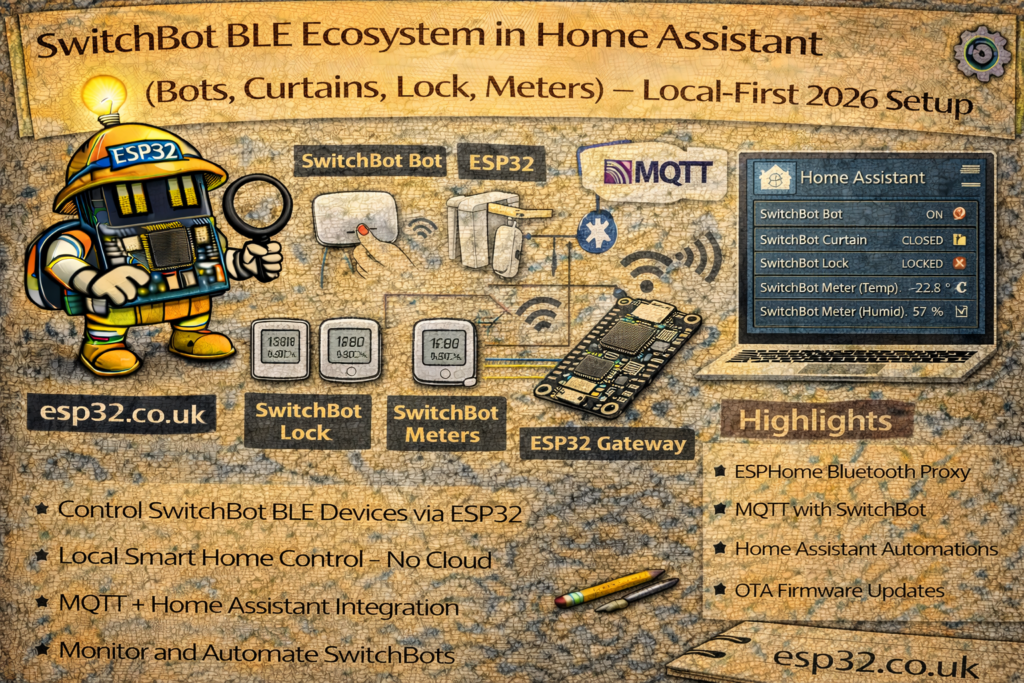
This guide shows how to build a bulletproof SwitchBot BLE setup in Home Assistant.
Phase 1: Decide your control strategy
Option A — BLE + ESP32 Bluetooth Proxies (local-first, recommended)
Best for:
- Local control (no cloud dependency for day-to-day control)
- Fast automations
- Good coverage via multiple proxies
Reality:
- You need proxies near the devices, especially for Curtains and Locks.
Option B — SwitchBot Hub (Hub Mini / Hub 2)
Best for:
- Extended range without placing many proxies
- IR features (Hub can also do IR control)
Tradeoff:
- Depending on model/integration path, some features may involve cloud.
Best practice: start local with BLE. Add a hub only where BLE range is painful (garage, thick walls, etc.).
Phase 2: Hardware design that makes it reliable
Proxy density rule (simple and effective)
For SwitchBot actuators, assume:
- 1 proxy per major room/zone that contains Bots/Curtains/Lock
- 1 proxy per floor minimum
Curtains and locks are the most demanding—if they’re unreliable, the fix is almost always: move/add a proxy closer, not “tweak YAML for hours.”
Placement rules
- Place proxies chest height or higher
- Avoid hiding them behind TVs, metal shelves, fridges, or inside cabinets
- Keep them on stable Wi-Fi (a proxy that drops Wi-Fi looks like “BLE unreliable”)
Phase 3: “SwitchBot-optimized” ESPHome Bluetooth Proxy
ESPHome proxies are the best way to scale BLE control around a home. For SwitchBot, two settings matter:
- ESP-IDF framework (generally best Bluetooth stability)
- Enough connection slots for active-control devices in that zone
Recommended proxy YAML (SwitchBot zone)
substitutions:
  name: "bedroom-ble-proxy"
  friendly_name: "Bedroom BLE Proxy"

esphome:
  name: ${name}
  friendly_name: ${friendly_name}

esp32:
  board: esp32-c3-devkitm-1   # or esp32dev for classic ESP32
  framework:
    type: esp-idf

logger:
api:
ota:
  - platform: esphome

wifi:
  ssid: "YOUR_WIFI"
  password: "YOUR_PASSWORD"
  ap:
    ssid: "BLE-Proxy-Fallback"
    password: "change_me"

captive_portal:

# Optional: only enable active scanning if you have a reason
# esp32_ble_tracker:
#   scan_parameters:
#     active: true

bluetooth_proxy:
  active: true
  connection_slots: 5
How to pick connection_slots
- 3: OK for light use (a couple of sensors, one actuator)
- 5: good default for a room with multiple SwitchBot actuators
- More than 5: only if you truly need it—and you should consider distributing devices across multiple proxies rather than pushing one proxy too hard
Practical guideline: if you have 2 Curtains + 1 Bot + a Lock all near one proxy, increase to 5 and keep that proxy close.
Phase 4: Home Assistant integration (no cloud required for basics)
- Settings → Devices & Services → Add Integration
- Add SwitchBot
- With proxies online, HA should discover devices automatically
Device specifics (what people miss)
SwitchBot Bot
You typically configure its behavior in the SwitchBot app first:
- Press mode (push and release)
- Switch mode (toggle with the accessory)
In Home Assistant, treat it like a mechanical actuator:
- Use scripts
- Add cooldown/debounce (prevents spam/double-press)
SwitchBot Curtain / Blind Tilt
- Calibration is usually done in the SwitchBot app first
- In HA, you’ll control it as a
cover(0–100%) - If it misses commands: proxy closer + retry script = 95% of the fix
SwitchBot Lock (encryption)
Some devices use encryption. During setup, Home Assistant may ask for credentials or a key step to obtain local keys (behavior varies by version). The main point:
- You may need a one-time setup step to enable local encrypted control.
- After that, daily operation can still be local over BLE.
Phase 5: Make it feel “premium” (reliability patterns)
5.1 Bots: cooldown to prevent double presses
Create a helper input_boolean.bot_cooldown and use a script:
script:
  coffee_button_press:
    alias: "Coffee Button Press (Safe)"
    sequence:
      - condition: state
        entity_id: input_boolean.bot_cooldown
        state: "off"
      - service: input_boolean.turn_on
        target:
          entity_id: input_boolean.bot_cooldown
      - service: button.press
        target:
          entity_id: button.switchbot_bot_coffee_press
      - delay: "00:00:03"
      - service: input_boolean.turn_off
        target:
          entity_id: input_boolean.bot_cooldown
5.2 Curtains: state-check + retry once
script:
  close_curtains_reliable:
    alias: "Close Curtains (Reliable)"
    sequence:
      - service: cover.close_cover
        target:
          entity_id: cover.bedroom_curtains
      - delay: "00:00:05"
      - choose:
          - conditions:
              - condition: template
                value_template: "{{ not is_state('cover.bedroom_curtains', 'closed') }}"
            sequence:
              - service: cover.close_cover
                target:
                  entity_id: cover.bedroom_curtains
This turns “occasionally missed BLE command” into “it always works.”
Phase 6: Practical automations (copy/paste patterns)
6.1 “Coffee Guardian” (don’t press if tank empty)
alias: "Kitchen: Morning Coffee (Guarded)"
trigger:
  - platform: time
    at: "07:00:00"
condition:
  - condition: state
    entity_id: binary_sensor.coffee_water_tank_contact
    state: "off"
action:
  - service: script.coffee_button_press
mode: single
6.2 Curtain Assist (manual pull → finish opening)
alias: "Bedroom: Curtain Assist"
trigger:
  - platform: numeric_state
    entity_id: cover.bedroom_curtains
    attribute: current_position
    above: 10
condition:
  - condition: template
    value_template: >
      {{ trigger.from_state is not none and (trigger.from_state.attributes.current_position | int(0)) < 5 }}
action:
  - service: cover.open_cover
    target:
      entity_id: cover.bedroom_curtains
mode: single
6.3 Smart Auto-Lock (only lock if door is closed)
alias: "Security: Smart Auto-Lock"
trigger:
  - platform: state
    entity_id: binary_sensor.front_door_contact
    to: "off"
    for: "00:02:00"
condition:
  - condition: state
    entity_id: lock.front_door_lock
    state: "unlocked"
action:
  - service: lock.lock
    target:
      entity_id: lock.front_door_lock
mode: single
Troubleshooting that actually works
Symptom: “Bot works but takes ages”
Most common causes:
- proxy too far / weak signal
- proxy overloaded in that zone
- Wi-Fi instability on the proxy
Fixes:
- Put a proxy in the same room
- Increase
connection_slotsto 5 - Add a second proxy if you have many active devices in one area
Symptom: “Curtain/Lock unavailable”
Most common cause: signal/placement.
Fix:
- Move proxy closer (often within the same room)
- Don’t hide proxy behind metal/TV
- If you see slot warnings in ESPHome logs, increase slots or distribute devices
Symptom: Commands sometimes fail
Fix:
- Use retry scripts for curtains
- Add cooldowns for bots
- Don’t rely on a single dongle for a whole house of active devices
Summary checklist
- Proxies placed near SwitchBot actuators (especially curtains/lock)
- ESPHome proxy uses ESP-IDF
connection_slots: 5in busy rooms- Curtains controlled via state-check + retry
- Bots controlled via script + cooldown
- If something is flaky: move/add proxy first, tweak later